

TL;DR: The fake CAPTCHA clipboard scam has been around for about a year, but it's ramping up fast right now, and this one doesn't ask you to tick a box or send a text. It asks you to press Windows key + R, paste something, and hit enter. Doing that installs malware built to steal passwords and saved logins. We saw this hit three people last week. Two had managed detection and response in place and were stopped within minutes. One didn't, and the damage was already done by the time it was caught.
A real CAPTCHA never asks you to open a program and paste something into it. If you see one that does, close it.
What this scam actually looks like
You land on a site promising something, a video, a document, an article you were trying to read, and you're asked to prove you're not a robot.
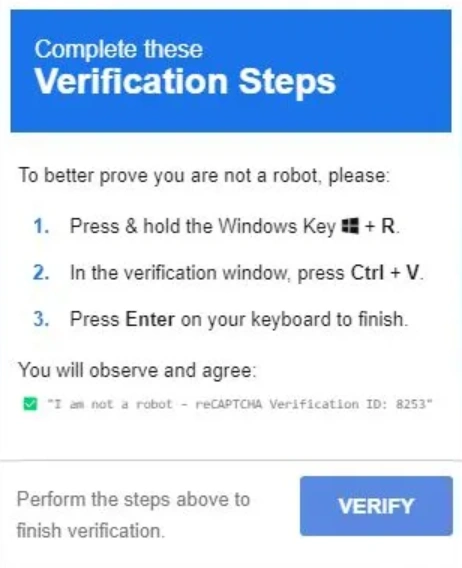
Nothing unusual so far. Then instead of the checkbox completing, you're shown a set of instructions
- hold the Windows key and press R,
- press Ctrl+V in the box that opens,
- then press enter to finish verifying.
It reads like a normal extra step. It isn't. Following those three instructions is how you infect your own device.
What's actually happening when you paste
The moment you clicked that first checkbox, the site quietly copied something to your clipboard. You didn't see it happen and you didn't approve it in any way that felt meaningful, but the page had already prepared a command and was waiting for you to run it.
The Windows key + R shortcut opens the Run box, a tool built into Windows for launching programs. Pasting and pressing enter tells Windows to fetch a file from the attacker's server and run it. What you briefly see on screen looks like a harmless confirmation code. What's actually running behind it is a script that downloads and installs an information stealer, malware designed to quietly lift saved passwords, browser logins and other sensitive data off the device.
This method started out being used against specific, higher value targets. It's since become common enough that anyone browsing an ordinary website can run into it.
What we saw last week
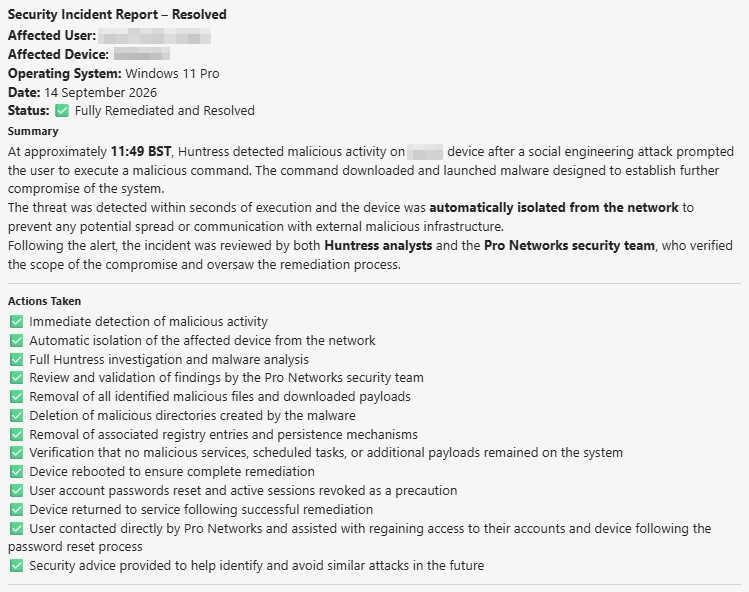
Three of our clients hit this exact scam within the same week. Two of them had our recommended Managed Detection and Response (MDR) running on their devices. In both cases, the malicious activity was picked up and shut down within minutes of the command running, before any data left the building.
The third didn't have MDR in place. That infection wasn't caught until Microsoft Defender's own scan flagged it hours later. By that point the stealer had already done what it was built to do.
Why the speed of the response matters more than the software
Standard antivirus and built in tools like Microsoft Defender are good at catching known threats, but a lot of that detection happens on a scan cycle rather than the instant something runs. That gap between infection and detection is exactly where an information stealer does its work. It doesn't need long.
MDR is a step beyond that. It's a team actively watching for unusual behaviour on a device in real time, not just checking files against a known list of threats. When something like this Run box command fires, that's the kind of behaviour MDR is built to catch immediately, which is the difference between an incident that gets shut down in minutes and one that isn't discovered until the damage is already done.
Incident Report - 14/09/26
What to do if someone on your team has already done this
Speed matters. Disconnect the device from the network straight away rather than shutting it down, since shutting down can sometimes lose useful evidence of what ran. Get your IT support or security team to check what the malware actually did, and assume any passwords saved in that browser need changing immediately, starting with email and anything financial.
The one rule worth repeating to your team
A genuine CAPTCHA never asks you to open a program on your computer and paste something into it. Not to "finish verifying," not as a shortcut, not ever. If a page asks for that, close it and don't paste anything, anywhere.
It's also worth pointing out to your team that this doesn't only show up on obviously dodgy sites. Legitimate looking pages get compromised or serve malicious ads without the site owner knowing, so "the site looked fine" isn't a reason to trust an unusual request.
Is this the same scam as the fake CAPTCHA text message scam?
No, it's a different method aimed at the same habit. The text message version tricks people into sending an SMS to a premium rate number. This one tricks people into running a malicious command through the Windows Run box. Both dress themselves up as a normal CAPTCHA step, which is exactly why they work.
How would I know if this has already happened to me or someone on my team?
Often you won't, not straight away, which is the entire problem with information stealers. They're built to run quietly in the background. Anyone who's followed those Windows key + R and paste instructions should treat it as a live incident and get it checked immediately, rather than waiting to see if anything looks wrong.
Does antivirus alone stop this?
It can catch it, but not always straight away. Antivirus and tools like Microsoft Defender are generally reactive, checking activity against known threats on a scan cycle. MDR adds continuous, active monitoring on top of that, which is why the response time in an incident like this can be minutes rather than hours.
We're a small business. Is this really worth worrying about?
Yes. This scam doesn't target big organisations specifically, it targets habits, and small teams are just as likely to land on a compromised page as anyone else. The businesses we support at 10 to 100 seats are exactly the size where one infected device can affect the whole network before anyone notices.
How can Pro-Networks Help?
We manage the IT and Cyber Security needs for over 200 businesses. Managed Detection Response (MDR) is a key component in our Business Armour protection package. If you aren't covered, or aren't sure - get in touch, we would love to help.

The Pro-Networks Insider
Delivered to your inbox every other month
The scams currently targeting businesses like yours.
A #ProNetTopTip that your team can put into practice in minutes.
Plain English updates on Microsoft 365 and IT changes that affect you.