

TL;DR: Email antispam services do far more than block obvious junk mail. They quarantine suspicious emails before they ever reach your inbox, give you tools to review and release held messages, and - as we found out this morning - catch convincing phishing attempts that even some threat intelligence databases haven't flagged yet. The question isn't whether your business needs this protection. It's whether your staff would have spotted what we spotted today.
_______________
It Started With a Notification at 7am
Most mornings, the first thing that lands in my inbox isn't a crisis. It's a quarantine report.
A short, clean email from our antispam service letting me know that something tried to reach me overnight - and didn't make it. Most of the time, it's exactly what you'd expect. A bulk marketing email. A newsletter from a service I signed up to years ago and never unsubscribed from. Occasionally something more sinister.
This morning was one of the more sinister ones.
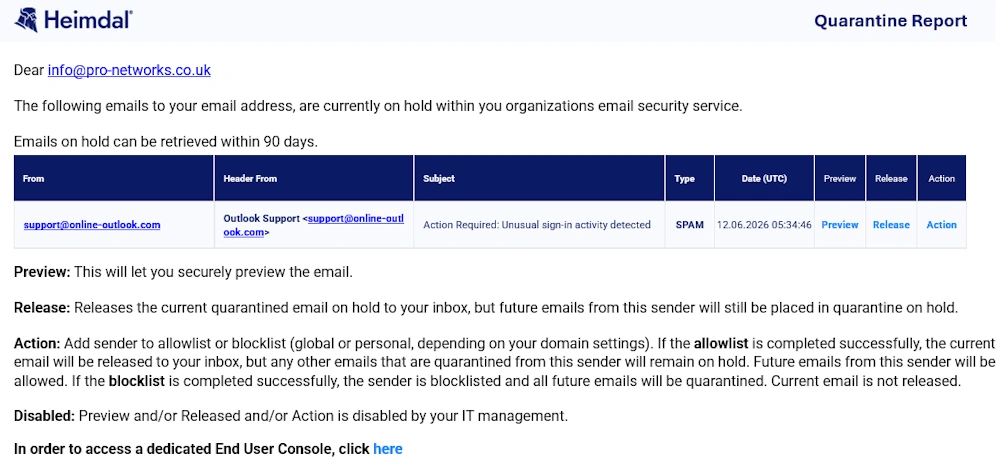
The report showed a single held message. The sender claimed to be Outlook Support. The subject line read: "Action Required: Unusual sign-in activity detected." It was flagged as spam, sitting in quarantine, waiting for me to decide what to do with it.
I had four options. I could preview it safely without releasing it to my inbox. I could release it - letting it through to land in my mailbox as normal. I could take action - adding the sender to an allowlist or blocklist, depending on what I found. Or I could simply ignore the email and leave it quarantined.
For the purposes of writing this blog, I chose to release it.
If you've read our previous blog on Pro-Networks MailSafe, you'll already understand what email antispam does and why it matters. What's changed since we wrote that in 2023 isn't the technology - it's the quality of what it's being asked to catch. The example below is a good illustration of exactly what we mean.
Letting the Wolf Through the Door - Deliberately
Clicking release on a quarantined email feels counterintuitive. Everything in your security training tells you not to. But I wanted to see exactly what would have landed in the inbox of any member of staff at any one of the businesses we support across Chester, Wrexham, the Wirral, Warrington and the wider North West - if their business didn't have this protection in place.
Within seconds, the email arrived.
This Is What Landed
And here's where it gets genuinely interesting - and more than a little unsettling.
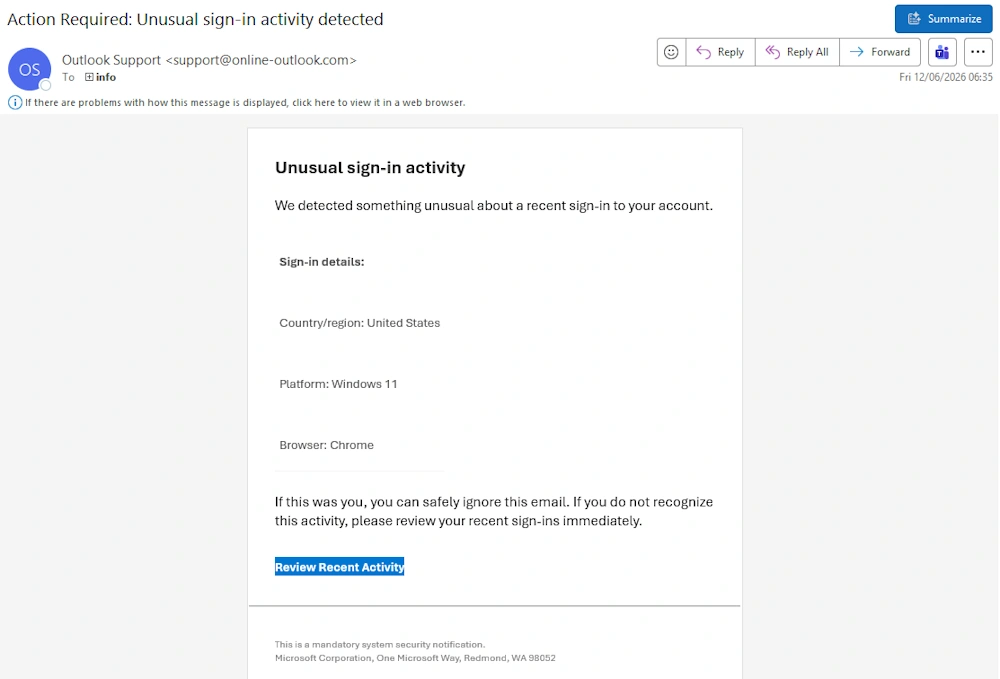
The email was well constructed. The formatting looked familiar - the kind of clean, corporate layout you'd expect from a genuine Microsoft security alert. The language was measured and professional. No spelling mistakes. No odd phrasing. No suspicious use of capital letters or aggressive urgency.
It warned of unusual sign-in activity on my account. It listed details - country of origin (United States), platform (Windows 11), browser (Chrome). It offered a single clear action: a blue button labelled "Review Recent Activity."
Now, look at the sender domain. It came from [email protected].
Not microsoft.com. Not microsoftsupport.com. Not even a clumsy attempt like micros0ft.com that the old-school phishing emails used to use.
Online-outlook.com
It's almost plausible, isn't it? At a glance - particularly if you're scanning your inbox quickly between meetings, or on your phone between calls - it could pass. The domain sounds vaguely Microsoft-adjacent. The email itself looks legitimate. And the call to action (reviewing unusual sign-in activity) is exactly the kind of thing you'd want to act on quickly.
That's precisely the point. These emails are no longer written by someone in a hurry with a poor grasp of English. They're crafted to be believable. And they're working.
So Where Does That Button Actually Go?
This is where I need to give a word of warning - do not, under any circumstances, click a link like this if you receive it. Even landing on a malicious page without entering any credentials can expose your device to risk.
Instead, I used a free tool called URLScan.io - a safe, sandboxed service that visits suspicious URLs on your behalf and shows you what's there without putting you or your device at risk.
What it found was revealing.
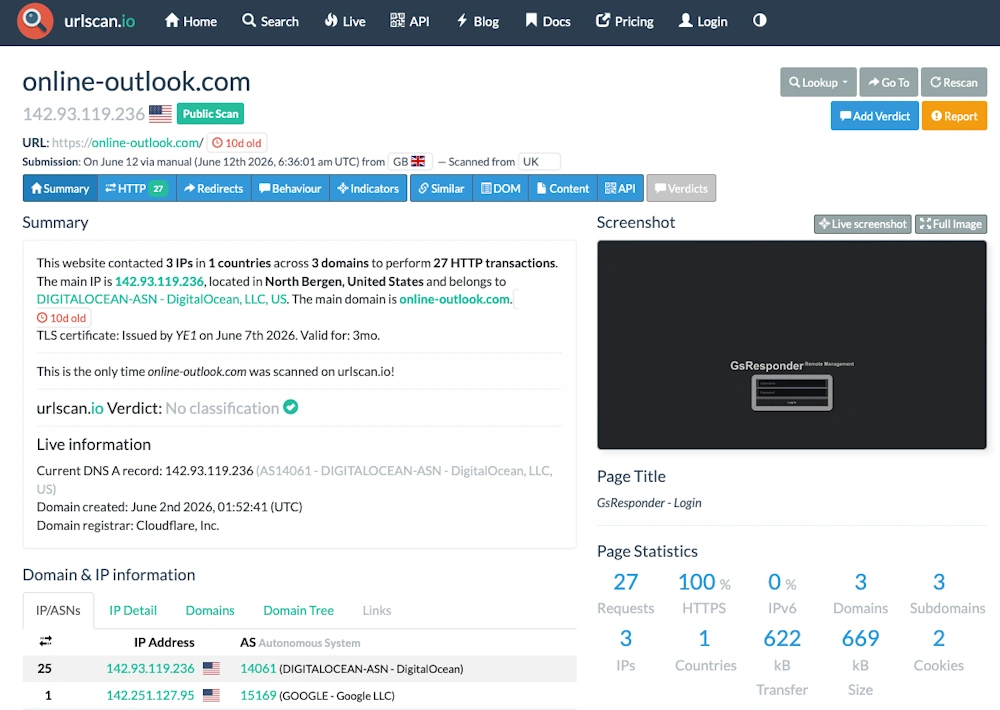
The domain online-outlook.com was created on 2nd June 2026. That's 10 days ago. It is hosted on a DigitalOcean server in North Bergen, United States - nothing to do with Microsoft. The TLS security certificate was issued just days ago and is valid for only three months, a classic sign of a throwaway domain built for a short-lived campaign.
But the real giveaway? The page title. Not "Microsoft Account" or "Sign in to Outlook." The scan revealed the page is actually running something called "GsResponder - Remote Management" - a login screen that, once you strip away the context of the email that got you there, looks nothing like Microsoft at all.
The mask slips completely the moment you arrive. But by then, a less cautious user might have already typed in their email address and password.
Here's the final twist. URLScan's own verdict? No classification. A green tick. Meaning this domain had not yet been flagged by major threat intelligence databases at the point this email arrived in my quarantine. Some security tools would have let this straight through.
Our antispam service caught it anyway.
So What Does Antispam Software Actually Do?
Most people think of antispam as a filter that catches obvious junk and keeps your inbox tidy. And it does do that. But the email you've just read about illustrates something much more important - a layered defence that works even when other tools haven't caught up yet.
A good email antispam service will:
• Analyse incoming emails before they reach your inbox, checking sender reputation, domain age, message headers, and content patterns
• Quarantine suspicious messages so they can be reviewed safely rather than deleted outright - because occasionally legitimate emails get caught too
• Give you the tools to preview, release, or permanently block senders based on what you find
• Apply rules at a domain level, so your IT team or MSP can manage policies across your entire organisation rather than relying on individual staff members to make the right call
• Log and report on what's being caught, giving you a clear picture of the threat landscape targeting your business
What it cannot do is replace human awareness entirely. The best antispam service in the world is still only as effective as the policies it runs on - and the culture of the business it's protecting.
Would Your Staff Have Spotted It?
That's the honest question at the heart of all of this.
Not your most technically minded member of staff. Not your IT contact. Your average team member, on a Tuesday morning, inbox full, halfway through a coffee.
The email looked right. The warning felt urgent. The button was right there.
If this had bypassed your antispam service and landed directly in their inbox - would they have clicked it?
If you're not completely sure of the answer, that's worth a conversation.
At Pro-Networks, we work with over 200 businesses across Chester, Cheshire, Wrexham, North Wales, Warrington, the Wirral and the wider North West, and email-based threats like this one are consistently among the most common attack vectors we see targeting SMEs. A well-configured antispam service, combined with staff awareness training, is one of the most cost-effective defences any business can put in place.
If you'd like to talk through what protection looks like for your business, we're happy to have that conversation. No jargon, no hard sell - just an honest look at what you have in place and whether it's enough.
Get in touch with the team here or call us on 01244 535527