

TL;DR: A sophisticated phishing attack called Kali365 is actively targeting Microsoft 365 accounts - including businesses right here in Chester, Cheshire, Wrexham, Warrington, and across the North West. It tricks users into entering a legitimate-looking Microsoft verification code, which hands attackers full access to Outlook, Teams, and OneDrive - bypassing MFA entirely. Our team has already intercepted attempts of this type - - made possible by the Identity Threat Detection and Response (ITDR) protection we have deployed across our client base.. Here is what you need to know to stay safe.
___________________
Kali365 - The Microsoft 365 Phishing Attack That Can Bypass Your MFA
Cyber threats are constantly evolving, and one of the most convincing attacks we are seeing right now is a technique known as Kali365. Our team has already intercepted attempts of this type, and we are expecting more across businesses in Chester, Cheshire, Wrexham, North Wales, Warrington, the Wirral, and the wider North West. This one is worth taking very seriously.
What Makes Kali365 Different?
Most phishing attacks rely on fake login pages or stolen passwords. Kali365 is different - and more dangerous - because it does not need your password at all.
Here is how it works. You receive an email or notification telling you that a document is waiting for you to view, sign, or open. It might look like a DocuSign request, a shared invoice, a voicemail notification, or a routine file-sharing email. The message looks professional and credible.
When you follow the link or scan the QR code, you are directed to what appears to be a genuine Microsoft sign-in page. Because the page is real - or closely mimics the real thing - nothing triggers your suspicion. You are then asked to enter a verification or device code.
This is the trap.
The code you are being asked to enter is actually an authentication code that was generated by the attacker for their own device. By entering it, you are unknowingly telling Microsoft that the attacker's device is trusted - granting them full access to your Microsoft 365 account. That means Outlook, Teams, OneDrive, SharePoint, and everything else connected to your account. All without your password ever being compromised. And critically - it bypasses multi-factor authentication (MFA) entirely.
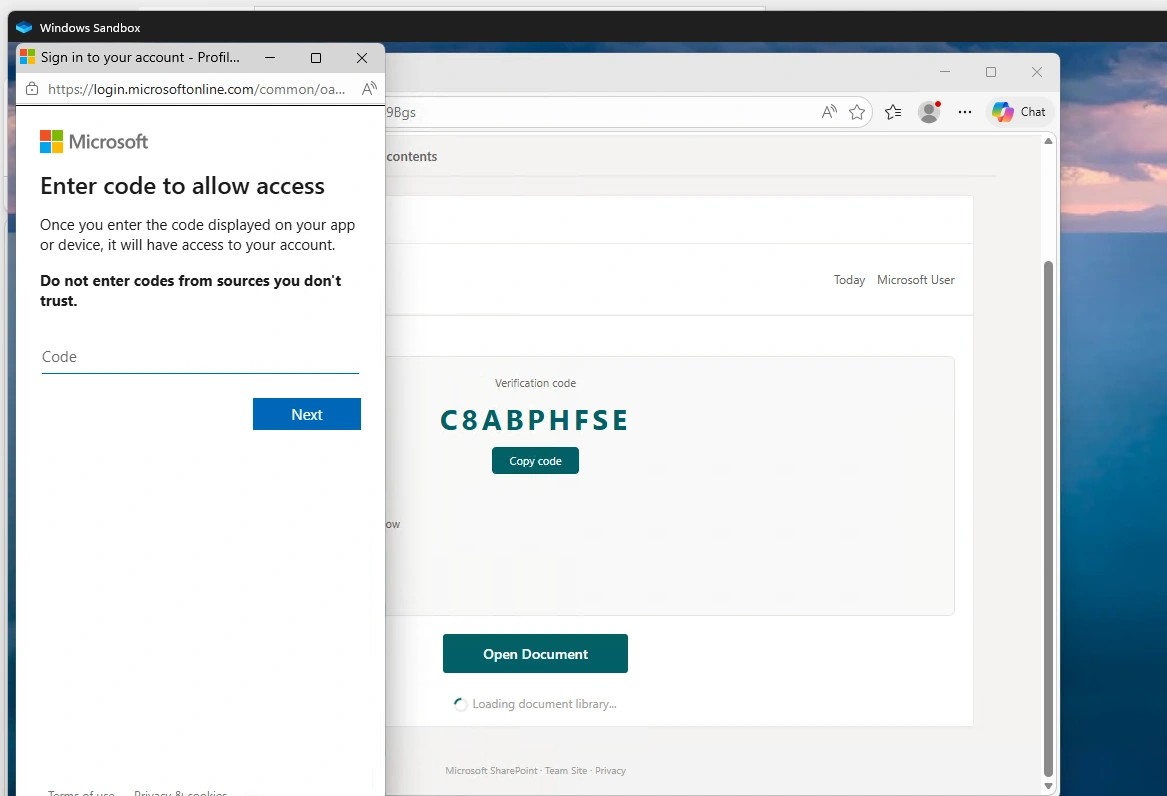
The image above is a real example of what this attack looks like. A legitimate-looking Microsoft verification prompt, a real-sounding code, and a convincing "Open Document" button. At a glance, nothing looks out of place. That is what makes it so effective.
What to Watch Out For
The warning signs can be subtle, but once you know what to look for, they are easier to spot:
- An email or notification claiming a document is ready to view, sign, or open
- Any instruction asking you to copy or enter a Microsoft verification code or device code
- Sign-in prompts that appear on a genuine Microsoft page - but were triggered by someone else
- Links or QR codes arriving in document-sharing emails, invoices, voicemail alerts, or anything styled like DocuSign
The key question to ask yourself is this - did I start this process? If the answer is no, stop.
What You Should Do
Never enter a Microsoft verification or device code unless you personally initiated the sign-in. The fact that you are looking at a real Microsoft page does not mean the request is legitimate. Attackers are deliberately exploiting the trust people place in familiar branding.
As part of your ITDR protection, our security team is actively monitoring for threats like Kali365 around the clock - but the human layer matters too. If something feels off, report it immediately.
If anything looks unexpected, pause and verify through a separate channel before proceeding. Pick up the phone. Check with your IT team. Do not assume the email is genuine just because it looks convincing.
Think You May Have Been Caught Out?
If you believe you have entered a code or interacted with a suspicious message, act fast. Time is critical. Contact your IT support team immediately so the account can be secured before the attacker has the chance to do damage. The sooner you report it, the better the outcome.
For businesses across Chester, Cheshire, Wrexham, Warrington, the Wirral, and the North West, our team at Pro-Networks is on hand to help you respond quickly and put protections in place to reduce your exposure. If you have any concerns at all, please do get in touch.
Cyber threats move fast. Your response needs to move faster.